![shelterbuddy_logo.jpeg]](https://21631173.hs-sites.com/hs-fs/hubfs/shelterbuddy_logo.jpeg?width=65&height=65&name=shelterbuddy_logo.jpeg)
Troubleshooting:
If you are using Edge and find the label isn't fitting neatly onto the label, please take the following steps:
- From the print medication screen, click on the cog icon in the top right-hand corner of your browser, then click on the option "Page Setup"
- In the section "Headers and Footers", make sure all options read 'Empty'
- In the Margins (millimetres) column, make the options for the Left, Right and Bottom margins '0' (zero).
- In that same section, ensure the option for Top margin is set at 10
- Your page should look like this:
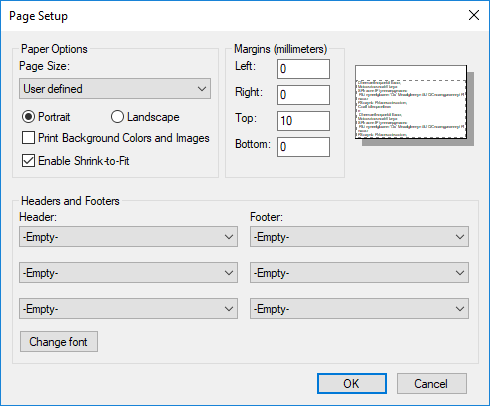
- Click ok to save
- You can now print your label!