![shelterbuddy_logo.jpeg]](https://21631173.hs-sites.com/hs-fs/hubfs/shelterbuddy_logo.jpeg?width=65&height=65&name=shelterbuddy_logo.jpeg)
Let's say you are overseeing a big organization that has three facilities that are all registered in the Adopets platform. Each of these facilities has its staff, pets, and adoption applications being received daily.
If your current role is Owner or Super Admin/User, you can easily switch between locations and access all data regarding each specific facility.
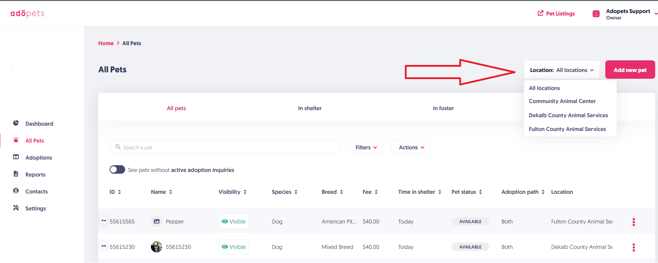
To switch between locations, look to the top of the webpage, in the header of the Adopets platform. Click on the name of your current location, located in the upper-right-hand corner of the page that says Location.
That will pop up a selector where you can pick another location to oversee, just like in the example below:
If you don't know which role you currently have set for yourself, or want to understand more about user permissions in the Adopets platform, check out the article.