![shelterbuddy_logo.jpeg]](https://21631173.hs-sites.com/hs-fs/hubfs/shelterbuddy_logo.jpeg?width=65&height=65&name=shelterbuddy_logo.jpeg)
Need to delete an existing location? Learn how simple it can be done.
If at any point you need to delete a location that has been created for whatever reason, follow these simple three steps to make it happen when you're logged at https://rescue.adopets.com/:
1) Go to Settings
2) Go to Locations
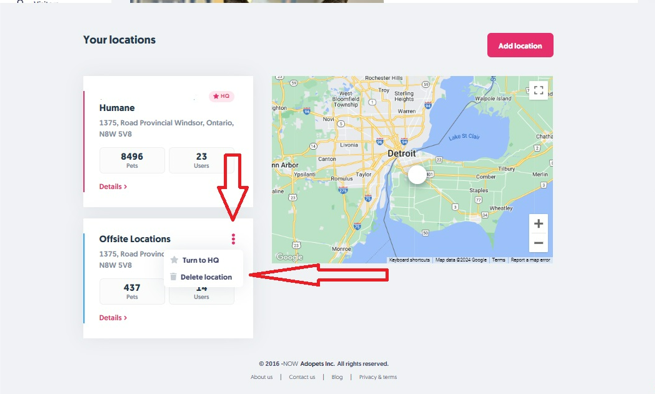
3) On the specific card corresponding to the Location you want to delete, click on the 3 dots and select Delete
-
If the current Location you're trying to delete has no users or pets associated with it, you can confirm the deletion process.
-
However, if it has any pet, user, or adoption applications associated with it, you need to select another location in which that data will be transferred to.
Want to know more about Locations? Don't forget to check out these other articles: