


AME
Integration

Overview
This guide explains how to link locations from your shelter software to the PetSmart stores available to your organization in AME. These connections are essential to ensure that animal data is routed correctly to each store’s adoption system.
Once your shelter software is authenticated, AME allows you to connect each shelter location to a specific PetSmart store.
⚠️ Important: To prevent animal duplication, a shelter location can only be linked to one store at a time.
🔄 Steps to Link Shelter Locations to Stores
-
Access the Integration Menu
Go to Settings → Integration to open your integration dashboard.
-
Open the Connections Tab
Select the Connections tab to view current links and available locations.
-
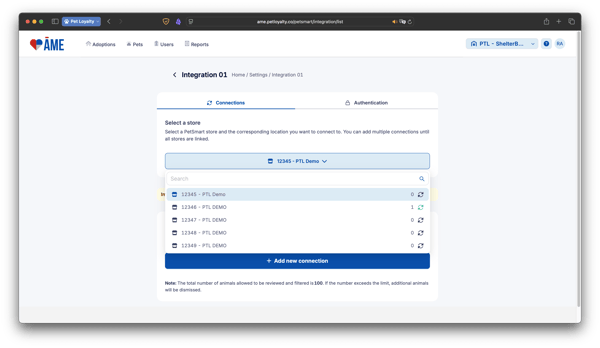
Link a Shelter Location to a Store
-
You can select a PetSmart store from the list provided by your shelter software.
-
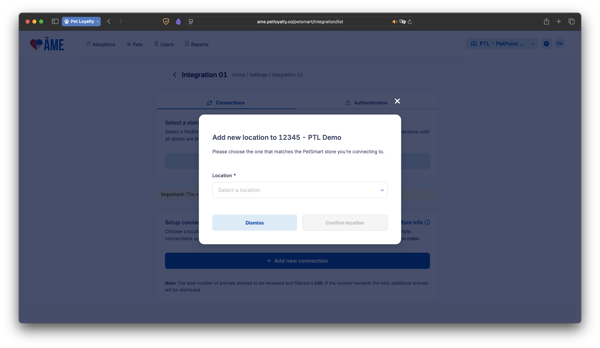
Click on Add New Connection and select the Location available to your Shelter Software.
-
Click Conform Location to validate and finalize.
Once the location is connected to a store, the system will begin syncing pet records from that shelter location to AME — typically within 5 minutes, but may take up to 1 hour to appear.
❓ Frequently Asked Questions (FAQ)
Q1: How should I configure PetSmart stores in my SMS?
To ensure pets display correctly in AME, it’s important to set up each PetSmart store as a separate location in your Shelter Management System (SMS). This way, you can move pets from your main shelter (or any other internal location) into the appropriate PetSmart store location — and that move will automatically sync to AME.
✅ Recommended:
-
Create one location per PetSmart store in your SMS.
-
When a pet is transferred to a store, move them into the matching store location in your SMS.
-
This keeps your data clean and ensures AME reflects the correct availability.
❌ Avoid:
-
Linking PetSmart stores to generic locations like “Main Shelter,” “Foster,” or “Transport.”
-
This could result in dozens or even hundreds of pets showing up as available at a store when they’re not actually there or ready for adoption.
Important: Following this setup helps prevent confusion, ensures accurate pet listings, and improves the experience for adopters and store staff.
Q2: What is a shelter location in this context?
It refers to a site, region, or sub-division defined within your shelter software — like “Main Facility” or “Downtown Campus.”
Q3: Can I link multiple locations to one store?
Yes, multiple shelter locations can be linked to the same PetSmart store, depending on how your shelter is structured.
Q4: Can I link one location to more than one store?
No. A location can only be linked to one store at a time to prevent animal duplication.
Q5: Do I need to re-authenticate to link a new location?
No, as long as your authentication is valid. If your credentials expire, AME will prompt you to update them.
Q6: What happens if I remove a location-store link?
When you remove a connection between a shelter location and a PetSmart store:
-
All animals from that location will be disconnected and no longer displayed in the Available Pets list.
-
However, if an animal from that location is already in an active adoption process, it will remain accessible under:
-
Adoptions > In Process
-
Adoptions > Complete (if finalized)
-
You can reconnect the location at any time to resume syncing new animals.